DIFF Devices DYNAMIX (Max for Live)
DYNAMIX is an advanced Max for Live device designed for precise, intelligent multiband compression with a clean and intuitive workflow.
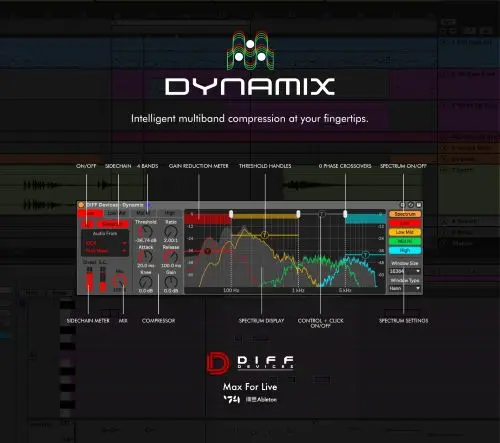
Fully integrated into Ableton Live, it gives you powerful dynamics control across four adjustable frequency bands, supported by zero-phase crossovers and real-time visual feedback.
Whether you’re tightening a mix, adding punch to drums, or refining a master, DYNAMIX provides the control and transparency needed for professional results.
With built-in spectrum analysis, sidechain routing, and fully customizable compression settings, it keeps your sound clear, dynamic, and controlled at every stage.
Key Features
• Multiband Compression – Four bands (Low, Low-Mid, Mid-High, High) for precise frequency control
• Real-Time Gain Reduction Meter – Visual feedback of compression activity
• Threshold Control per Band – Easily adjust compression intensity for each range
• Band Soloing – Alt + Click to isolate a band
• Band Muting – Control + Click to mute a band
• Quick Reset – Double-click any control to reset to default
• Zero-Phase Crossovers – Clean, transparent processing with no phase distortion
• Sidechain Input – External routing for ducking and dynamic shaping
• Spectrum Display – Real-time frequency and compression visualization
• Spectrum Toggle – Enable/disable for workflow flexibility
• Custom Spectrum Settings – Adjustable window size and analysis type
• Full Compressor Section – Attack, release, ratio, knee, and gain control
• Mix Control – Blend processed and dry signal for parallel compression
• Ableton Integration – Seamless UI adaptation to Live themes
Installation Guide
Inside the ZIP file you’ll find:
• DIFF Devices – DYNAMIX.amxd
Steps:
- Save the
.amxdfile anywhere on your computer or in your Max for Live devices folder - Drag and drop it into a MIDI or audio track in Ableton Live
- Click the save (floppy disk) icon in the device window
- This automatically stores it in your User Library and creates a
.advpreset file - You’re ready to use it
System Requirements
• macOS & Windows
• Requires Ableton Live with Max for Live installed
• Minimum Ableton Live 12
• M1 Mac compatible
A precision multiband dynamics tool built for producers who want full control without sacrificing clarity or workflow speed.